Robotics Data Pipeline Tools: MCAP vs LeRobot vs OpenPi Guide
Updated: Sep 15
Scaling a physical AI workflow means turning raw robot sensor streams into clean, ready-to-use model inputs. When these pipelines stall, teams waste weeks converting file formats and fixing broken timestamps instead of training better policies. The right robotics data pipeline tools eliminate those bottlenecks by handling live recording, dataset management, and model deployment in a single integrated stack.
Speak with the Trossen technical team to compare robotics data pipeline tools and design a complete data workflow for your research.
Choosing between MCAP, LeRobot, and OpenPi requires understanding how each tool maps to a specific stage of the physical AI pipeline. This guide compares their data formats, ecosystem integrations, indexing strategies. And optimal use cases so you can assemble a hybrid workflow that moves from live robot recording to trained model deployment in hours instead of weeks.
Supporting this full cycle is critical when building a robotics data collection pipeline that scales across hardware, software, and team boundaries. Let us start with a clear definition of what these tools are and how they fit together.
What Are Robotics Data Pipeline Tools?
Answer: Robotics data pipeline tools are software frameworks designed to record, sort, and stream high-frequency sensor data from real robots to physical AI models. They manage multi-modal inputs like video, depth, IMU, and joint states across every stage of the robotics lifecycle: live capture, dataset curation, and model training or inference.
Smart robots need a steady stream of rich sensor data. Robotics data pipeline tools are the software systems that move, clean, and format that raw sensor data. By standardizing on a shared toolset, research teams can go from first experiment to model training in hours rather than weeks. Key systems include MCAP for high-speed live logging, LeRobot for assembling training-ready datasets, and OpenPi for loading and feeding data into model training loops.
The role of multi-modal inputs
Physical AI systems do not just look at the world. They touch, feel, and track their own motion. Pipelines must manage diverse sensor feeds including video, depth, IMU, and joint states in real time. Groups like the National Institute of Standards and Technology study how robots gather and process data at scale.
Using shared container formats avoids custom data tools that slow down research. Standardized robotics dataset formats make it easy for teams to share datasets, build on proven research, and ensure that logs remain accessible for years. Choosing a standard format reduces conversion errors and simplifies training on public datasets.
Three key pipeline stages
A modern data flow for robots has three main phases:
- Capture
records real-time sensor data from the robot. MCAP handles these high-speed streams with Schema, Channel, and Message records plus Chunk compression, preserving joint states and depth feeds without dropping frames.
- Dataset
turns raw recordings into training-ready data. LeRobot structures observations and actions into clean episodes for imitation learning pipelines.
Model deployment
loads trained policies onto robot hardware. The
shows how to run learned models on real robot arms, closing the loop from data to action.
MCAP: High-Performance Container for Real-Time Recording
Answer: MCAP is a file container built for real-time recording of multi-modal robotic data. It uses schema-based message logging and chunk compression to handle high-frequency sensor streams with minimal CPU overhead and zero frame drops.
How MCAP handles multi-sensor streams
Live robotic data comes from many sources at once. A typical setup records video, depth maps, and high-frequency joint states. MCAP handles this complexity by saving data as schema, channel, and message records. Research labs such as those at Stanford University use container-based formats to build and organize large robotic datasets.
MCAP groups messages into chunks with optional compression, keeping file sizes small without slowing write speeds. This design is critical when recording high-definition video streams alongside joint logs at 200 Hz. Because MCAP is part of the Foxglove ecosystem. You can open recordings directly in Foxglove Studio to visualize 3D robot models, sensor inputs, and system logs in one dashboard.
Why indexing matters for large-scale robotics data
Robotic datasets can grow to terabytes. Finding a specific moment in a massive file can take too long if the reader must scan from the start. MCAP solves this with a built-in summary index at the end of every file, allowing developers to jump to any timestamp instantly. This random-access feature makes MCAP one of the most efficient containers for data playback and inspection.
Using TrossenMCAP in physical AI workflows
The Trossen SDK uses a custom variant called TrossenMCAP. Our systems record episodes locally to this format during teleoperation sessions, supporting joint positions up to 200 Hz and multiple camera feeds simultaneously. Once the recording completes, the SDK converts TrossenMCAP files directly to LeRobot format. This fast transition moves teams from first experiment to model training in hours instead of weeks.
LeRobot: The Training-Ready Dataset Standard
Answer: LeRobot is an open dataset standard from Hugging Face that turns raw robot recordings into clean, structured training data for imitation learning. It provides ready-to-use data loaders, Hub-native streaming, and direct compatibility with popular physical AI model frameworks.
A major challenge in physical AI is converting raw robot trials into clean training data. Standard data pipeline tools must handle video streams, joint angles, and force sensors simultaneously. Built by Hugging Face, LeRobot connects raw data collection with model training, making deep learning pipelines dramatically faster to set up and iterate.
A bridge from data to training
Building a capable robot policy requires hundreds of physical trials. Raw logs must be cleaned, aligned across frames, and saved in a format the AI can read. MCAP is ideal for high-speed recording, and LeRobot is optimal for model training. This two-stage approach lets you focus on teaching skills rather than writing conversion scripts. Researchers at the Berkeley Artificial Intelligence Research Lab use standard datasets to train new imitation learning models, sharing their work across labs through common data structures.
New dataset features in LeRobot v3
LeRobot v3.0 stores tabular data in Parquet files and video streams in MP4 files, supporting Hub-native streaming. This design means your model loads data directly from the Hugging Face Hub during training instead of downloading the entire dataset first. Delta timestamps and rich metadata track the exact timing between camera frames and joint commands, a requirement for training models that react in real time.
Direct export with the Trossen SDK
The Trossen SDK records robot trials in TrossenMCAP format and converts them to LeRobot for training with a single command. You can use our data collection SDK to record real-world trials on Trossen robot arms, then transform those recordings into LeRobot datasets in minutes. This direct export skips complex intermediate conversion steps.
Request a demo of the Trossen SDK by contacting our engineering team today.
OpenPi: The Model-Layer Data Pipeline
Answer: OpenPi is an open-source model pipeline from Physical Intelligence that loads, scales, and streams training data to vision-language-action models. It supports pi0, pi0-FAST, and pi0.5 architectures with native LeRobot integration and both PyTorch and JAX backends.
Once your training datasets are ready, you must feed them to physical AI models. This step requires purpose-built pipeline tools to manage data loading, normalization, and model iteration. OpenPi, an open-source project from Physical Intelligence, fills this role. Researchers at institutions like UC Berkeley use these tools to train advanced robot policies.
The three core pipeline layers
OpenPi uses three layers to prepare data for training:
- Configuration
defines data paths, model sizes, and training hyperparameters.
- Transformation
normalizes and scales input ranges using built-in Python scripts. Mean and standard deviation statistics ensure clean, normalized joint and camera data.
- Loading
streams batches to the training loop from LeRobot datasets or alternative sources like RLDS and synthetic data.
Multi-model support and dataset formats
OpenPi supports three physical AI models: pi0, pi0-FAST, and pi0.5. It works with both PyTorch and JAX, so teams can debug with PyTorch and accelerate training on large clusters with JAX. Its native input format is LeRobot, enabling seamless streaming from Hugging Face. OpenPi also imports data from RLDS, DROID datasets, and synthetic sources. In benchmarks like the Stanford BEHAVIOR challenge, researchers use these model pipelines to validate robot learning at scale.
Trossen SDK and OpenPi setup
The Trossen SDK records robot tasks to MCAP, converts files to LeRobot datasets, and feeds them into OpenPi for training. Once your dataset is ready, follow the OpenPi tutorial on the Trossen documentation site to start training. This end-to-end workflow gets your physical AI system running in hours instead of weeks.
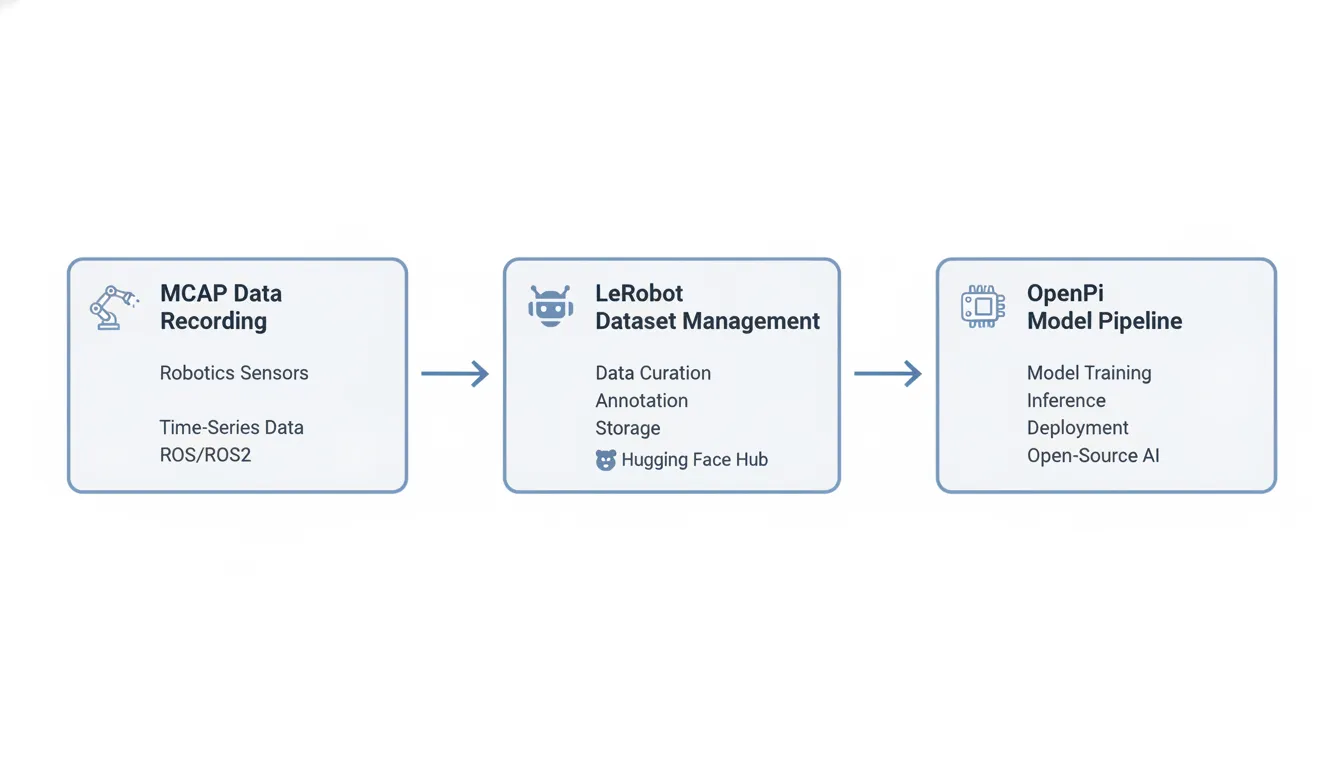
MCAP vs LeRobot vs OpenPi: Side-by-Side Comparison
Answer: MCAP, LeRobot, and OpenPi are not competing tools. They serve complementary stages of the physical AI data pipeline: MCAP captures high-speed sensor data, LeRobot manages training datasets, and OpenPi runs trained models on real robot hardware.
Core jobs for each tool
- MCAP
is designed for the capture stage. It records raw sensor data at high speeds without frame drops and keeps files small with Chunk compression.
LeRobot
manages the dataset stage. It converts raw files into clean, structured training data and streams it to the cloud for model training. Research teams at
use these formats to build and share robot datasets.
- OpenPi
operates at the model deployment layer. It reads clean data to feed vision-language-action models like pi0 and runs the inference loop on real robot hardware.
Feature | MCAP | LeRobot | OpenPi |
Pipeline Stage | Data capture and live logging | Dataset management and training | Model evaluation and deployment |
Primary Use Case | Raw sensor recording and playback | Training end-to-end physical AI | Running low-latency policy models |
Data Format | Schema-based pub/sub messages | Parquet data and MP4 video files | LeRobot datasets and model weights |
Ecosystem Integration | Foxglove Studio, ROS 2, and C++ | Hugging Face Hub and PyTorch | Physical Intelligence models and JAX |
Data Indexing | Built-in index for fast random access | Hub-native streaming of episodes | Unified loaders for multiple sources |
Data Speed | Optimized for high-frequency logs | Fast batch loading for training | Real-time action loops on hardware |
Training Readiness | Needs parsing before model training | Ready out of the box for training | Uses trained models to run inference |
How the formats work together
Choosing the right robotics dataset formats affects your pipeline speed and storage costs. A misaligned format can slow training by hours or days. The recommended approach uses MCAP for recording, LeRobot for dataset management, and OpenPi for model deployment. This hybrid strategy lets you use the best tool for each stage while keeping the pipeline open and easy to maintain.
Explore the Trossen data collection SDK to record joint data to MCAP and convert it to LeRobot format for training.
How to Choose the Right Data Pipeline for Your Workflow
Answer: The best pipeline combines MCAP for live recording, LeRobot for dataset management, and OpenPi for model deployment. Most research teams find that no single tool covers all stages, making a hybrid approach the most practical and scalable choice.
A physical AI workflow rarely relies on a single dataset format. Most teams combine multiple tools to cover recording, training, and deployment. The Trossen SDK supports this full workflow by connecting MCAP recording, LeRobot dataset conversion, and OpenPi model training in one integrated pipeline.
A hybrid pipeline approach
The most efficient research setups combine three tools:
- MCAP
records live robot actions with high throughput and low overhead.
- LeRobot
converts those recordings into structured datasets for imitation learning.
- OpenPi
trains and runs vision-language-action models on real robot arms.
Engineers at UC Berkeley use this combined approach to run standard robot learning tasks at scale. By linking proven tools, you eliminate custom data code and accelerate every stage from recording to deployment.
Handling multi-modal inputs
Modern robot tasks need diverse sensor data. Pipelines must manage video, depth, IMU, and joint state streams simultaneously. The Trossen SDK supports recording joint states at up to 200 Hz and cameras at custom frame rates, ensuring you capture fine movements during robot trials.
Connecting logs to training
Once sensor data is recorded, the Trossen SDK converts TrossenMCAP files to LeRobot V2 for training with a single step. This eliminates manual conversion work and lets research teams focus on model iteration rather than data plumbing.
Frequently Asked Questions
Can you convert MCAP files to LeRobot format?
Yes. The Trossen SDK records teleoperation demonstrations in TrossenMCAP and converts them to the LeRobot V2 dataset standard. This ensures high-speed sensor data is ready for training machine learning models.
Can you load LeRobot datasets into OpenPi?
Yes. According to the OpenPi repository, LeRobot is the native input format for training. OpenPi can also load data from RLDS or synthetic sources, adapting them for vision-language-action models.
Which robotics data pipeline tools are best for real-time recording?
MCAP is the strongest choice for live recording. As detailed in the Foxglove MCAP specification, it stores multi-modal sensor inputs with low CPU overhead and efficient indexing for fast message retrieval.
What types of data must robotics data pipeline tools support?
Robotics pipelines must handle diverse multi-modal inputs including video, depth, IMU, and joint states. Robust tools coordinate these inputs at varying frame rates to ensure clean alignment during physical AI training workflows. A guide on building a robotics data collection pipeline covers the full data management process in detail.
Ready to build a physical AI data pipeline that scales?
A well-designed data pipeline turns raw robot trials into clean, deployable model inputs without manual conversion work. MCAP handles high-speed capture, LeRobot manages training-ready datasets, and OpenPi connects those datasets to physical AI models. Each tool fills one slot in the pipeline, and together they form a repeatable workflow that accelerates every stage of robot learning research.
Ready to build? Contact the Trossen technical team to design your physical AI data pipeline and get started on your project today.
Comments